Belt Requirements
Belt requirements are the rules your gym uses to decide when a student is ready to be considered for promotion. GRADR checks these requirements automatically, surfacing students who meet your thresholds so you can focus on the judgment call, not the bookkeeping.
This is one of the most flexible (and therefore most complex) parts of GRADR. That flexibility is intentional: every academy runs its grading system differently. Some promote strictly by class count. Others use minimum time-at-rank, or require students to complete specific areas of the curriculum before moving up. Many use a combination. GRADR is built to accommodate all of these approaches, which means there are more settings here than in most other parts of the software.
Take your time with this section. The defaults are reasonable starting points, and you can change anything at any time.
The Core Idea: Per-Milestone Class Counts
GRADR breaks each belt into a sequence of milestones:
- For adults, every belt has 4 stripes plus a final "Promote to next belt" milestone (5 milestones in total).
- For kids, every belt has N stripes plus a final "Promote to next belt" milestone, where N is the stripe count you configure (1–4).
Each milestone has its own class-count threshold, and the counter resets after every milestone is awarded. A student earning Stripe 1 doesn't carry classes over toward Stripe 2; the count restarts.
This is the most important shift to understand: class counts are not "how many classes since last promotion" but "how many classes since the previous stripe or promotion."
Why IBJJF? A Note on the Defaults
GRADR's default requirements are based on the minimum time-at-rank guidelines published by the International Brazilian Jiu-Jitsu Federation (IBJJF), the sport's largest governing body. These are not rigid rules you must follow; they are a widely-accepted baseline used by academies worldwide as a starting point.
The IBJJF minimum time guidelines for adult belts are:
| Belt | Minimum time before promotion |
|---|---|
| White Belt | ~1 year |
| Blue Belt | ~2 years |
| Purple Belt | ~18 months |
| Brown Belt | ~1 year |
GRADR converts these time windows into a total class count (assuming two training sessions per week), then splits that total evenly across each milestone within the belt. For example, a White Belt total of ~100 classes splits into 20 classes per stripe and 20 classes for the final promotion to Blue.
The per-milestone default for each belt appears as a greyed-out placeholder in the input field. Leave the field blank to use the default, or enter a number to override it.
These are minimums. GRADR will never automatically promote anyone. It surfaces students who have met your thresholds. The decision to promote always belongs to you.
How Promotion Readiness Works
When GRADR checks whether a student is ready to advance, it looks at up to three things:
1. Per-milestone class counts
GRADR counts how many classes the student has attended since their most recent milestone (the previous stripe, or the previous belt promotion if no stripes have been awarded yet on this belt). That count is compared against the threshold for the next milestone in line.
This applies to every step along the way: each stripe, and the final promotion to the next belt.
2. Time at rank (the time gate)
Separately from class count, you can require a student to hold their current belt for a minimum number of months before they become eligible for the belt promotion. This is the time gate.
The time gate only applies to the belt promotion itself. It does not gate intermediate stripes. Setting it to 0 disables it entirely for that belt.
This is useful if your academy follows IBJJF competition rules or simply wants to ensure students have enough time to internalize a rank before moving up.
3. Curriculum area requirements (optional)
If your gym uses Curriculum Blocks, you can require students to have attended a minimum number of classes in specific curriculum areas before they are eligible for promotion. For example, you might require a Blue Belt student to have attended at least 20 classes in a guard passing area before being considered for Purple.
This requirement is fully optional. If you have not configured area requirements for a belt, GRADR skips this check entirely.
The Readiness List
The Create New Grading tab in Grading is your primary tool for seeing who is ready to promote.
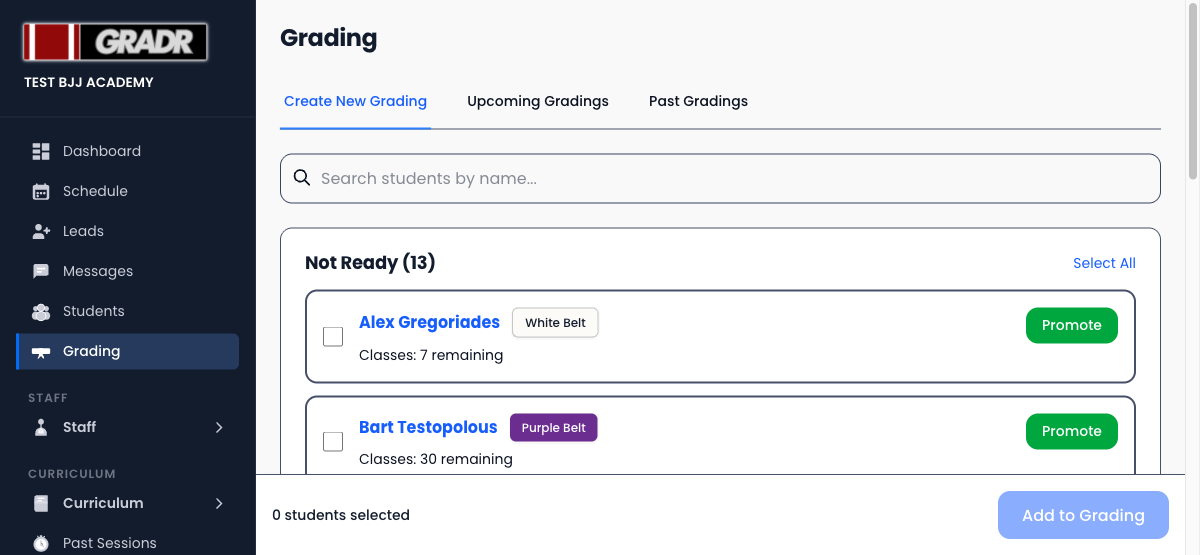
Students are grouped into three buckets:
- Ready — met the class-count threshold for their next milestone (and any age requirement).
- Age-Blocked — met the class count, but not yet the minimum age for the next rank. This is why class count alone isn't the whole picture: a student can be "trained enough" but still too young to advance.
- Not Ready — still has classes remaining. The group shows how many each student needs before hitting their next milestone.
This gives you a clear picture before you build a grading session.
Instructor Overrides
The readiness system is advisory, not enforced. You can always add any student to a grading session regardless of their readiness status, and you can override the target rank for any student in a session.
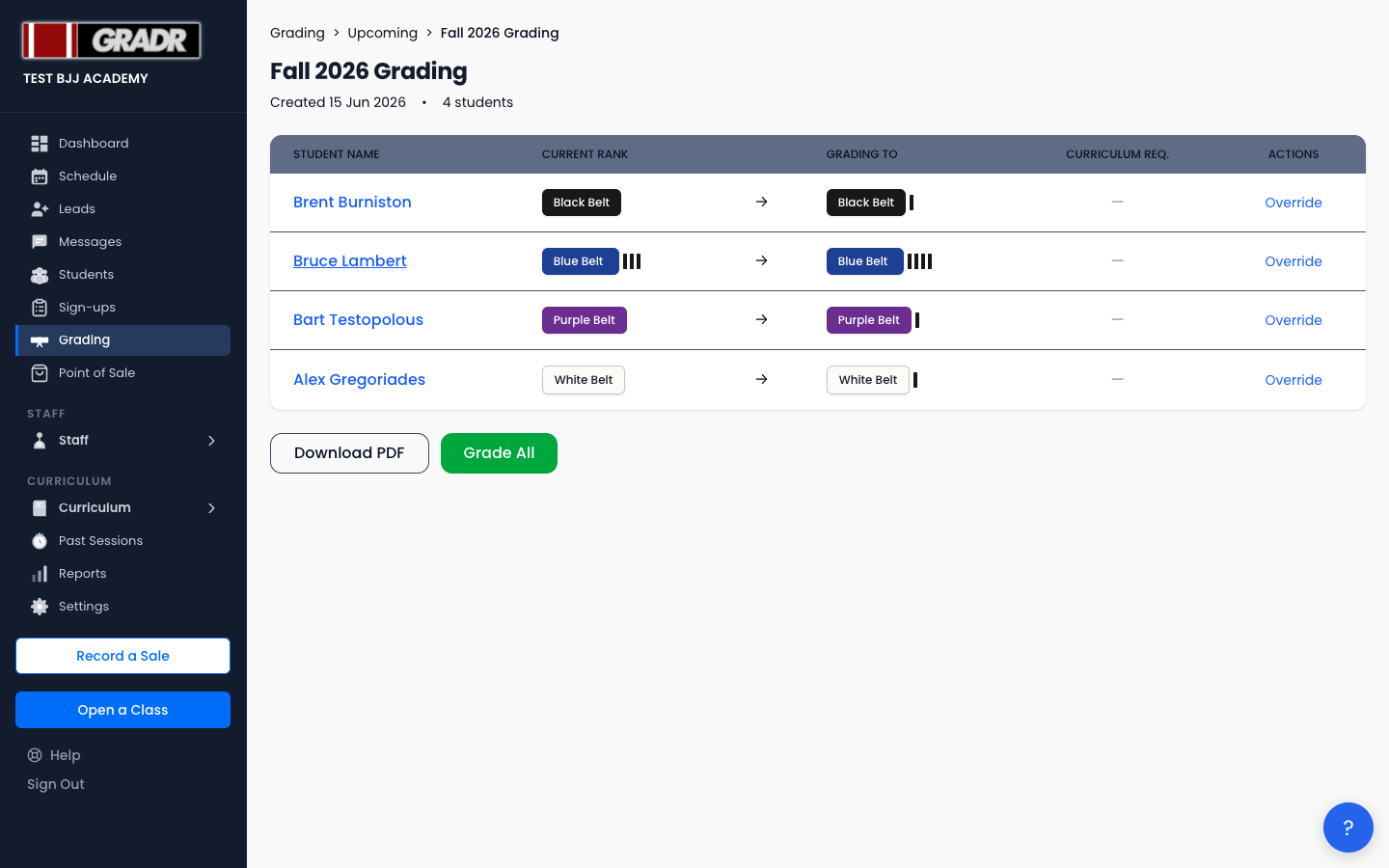
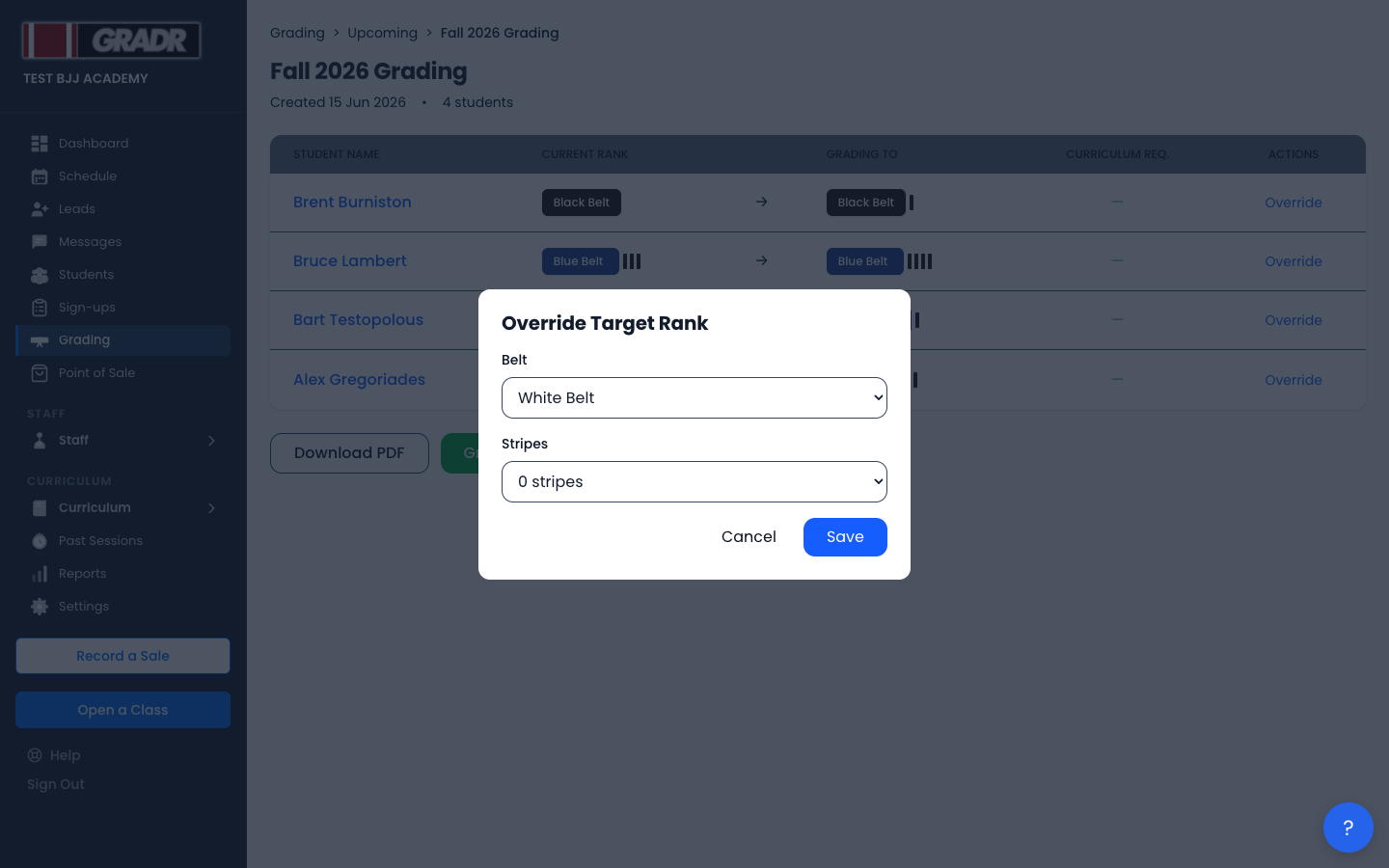
When viewing a grading session, click Override next to any student to change the belt or stripe they will be promoted to.
The Override Target Rank modal lets you select any belt and stripe count.
Overrides are logged. The promotion history on the student's profile will reflect the rank they were actually awarded, regardless of what the system recommended.
Adults vs. Kids Tracks
Belt requirements are configured separately for the adult and kids tracks. Kids martial arts programs often use different belt colors, shorter time windows, more stripes per belt, and different class count thresholds than adult programs. GRADR keeps these completely independent so you can calibrate each track to match how your academy runs.
Switch between tracks using the Adults and Kids buttons at the top of the Belt Requirements settings.
Configuring Belt Requirements
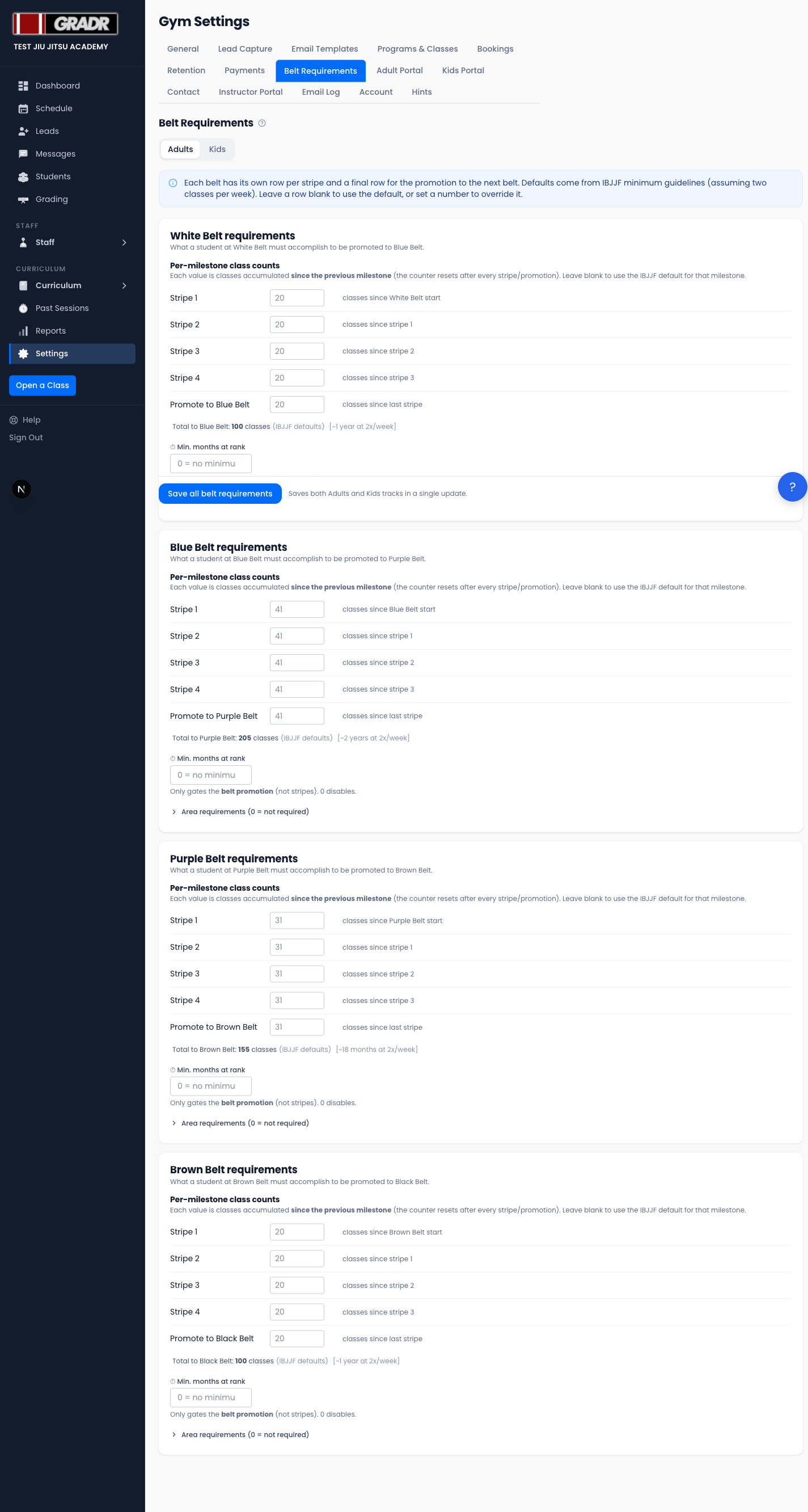
Go to Settings → Belt Requirements to configure your thresholds.
The per-milestone table
Each belt has its own card. Inside the card, the Per-milestone class counts table lists one row per stripe plus a final row for the promotion to the next belt.
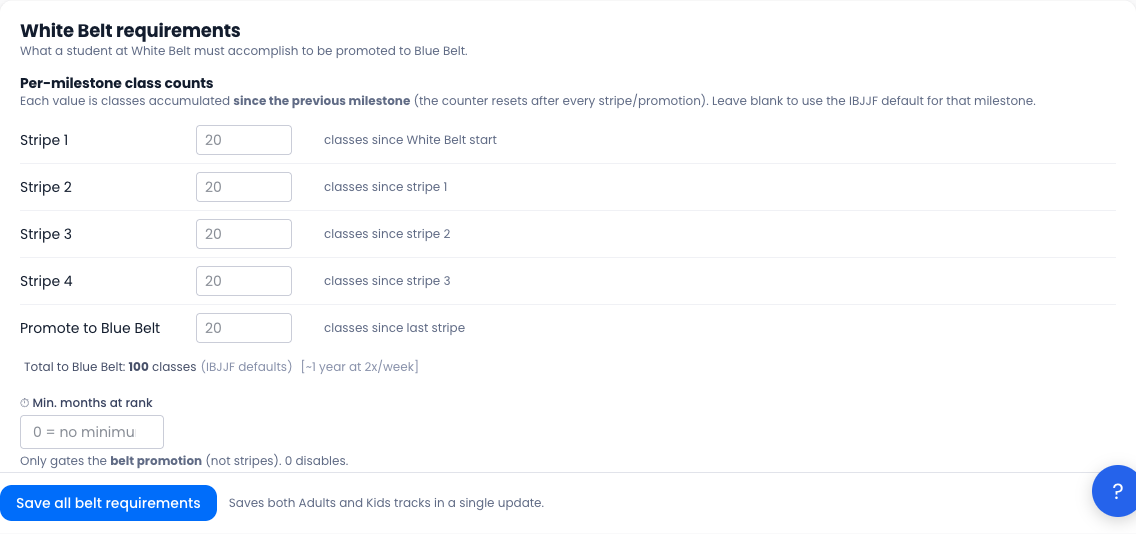
For each milestone:
- The input shows a greyed-out placeholder with the IBJJF default for that milestone. Leave the field blank to use that default.
- Enter a number to override the default. When overridden, the row is tagged
(overridden)to make it easy to spot. - The label to the right of each input clarifies which counter the value applies to (e.g. "classes since stripe 2"), to reinforce that each milestone has its own reset counter.
Below the table, GRADR shows a read-only total: the sum of all per-milestone values for that belt. This is informational: it confirms the per-milestone numbers add up to a sensible belt-level total. You cannot edit this number directly; it always reflects the sum of the rows above.
The time gate
Below the milestone table, the Min. months at rank input controls the time gate. Leave it at 0 to disable. Any non-zero value sets the minimum number of months a student must hold their current belt before becoming eligible for belt promotion (intermediate stripes are not gated).
Area requirements
Below the time gate, click Area requirements to expand the collapsible area table.
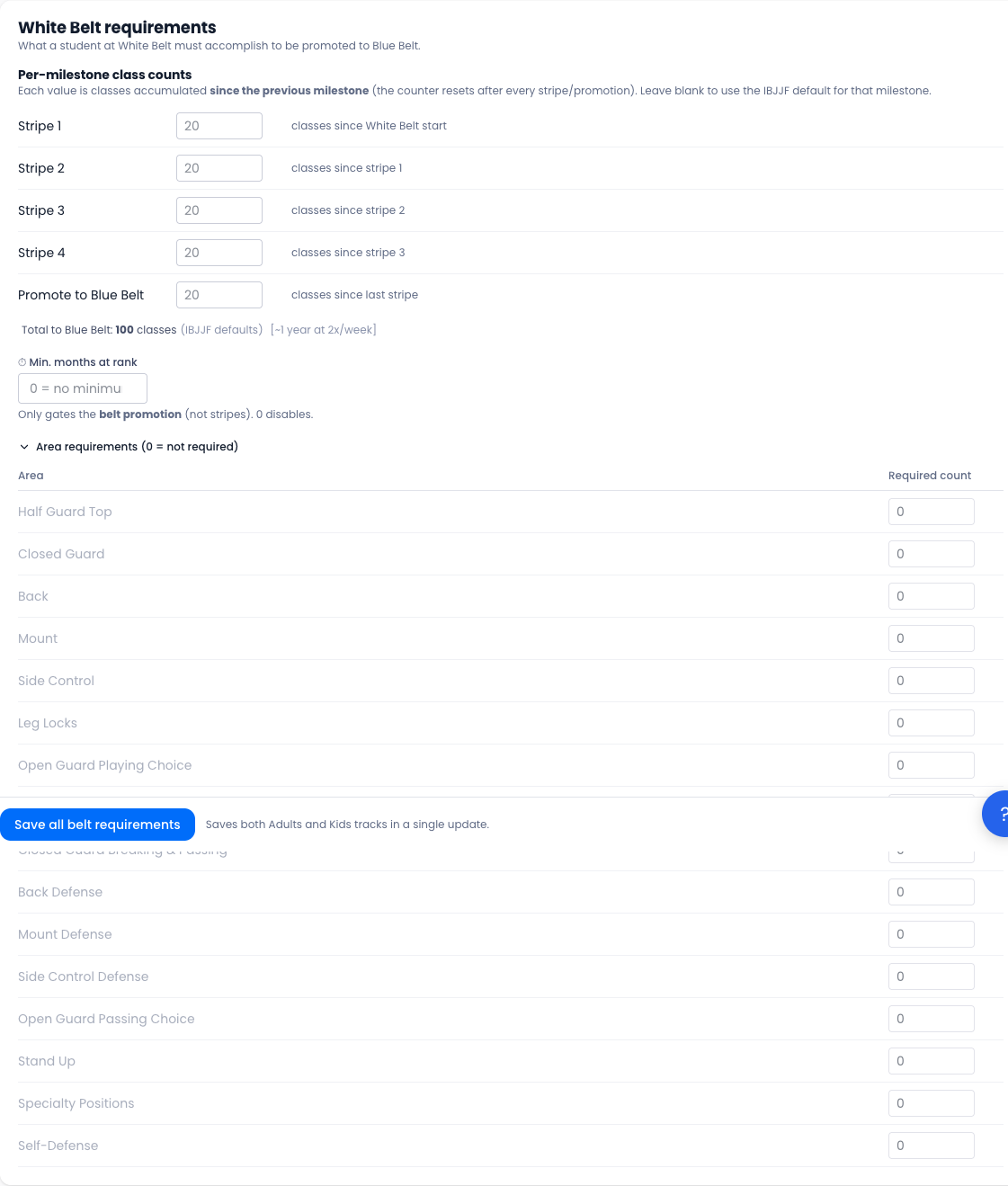
Each curriculum area gets a row. Enter a required count for any area that must be completed before the next promotion. Set to 0 (or leave at 0) to skip the area requirement.
If an area is required but is not present in any live or completed Curriculum Block, GRADR flags it with an amber Unreachable badge. Students cannot earn credit for an area that no block actually covers, so the requirement would be impossible to meet. Either remove the requirement or add the area to a block.
The Kids track and the stripe-count setting
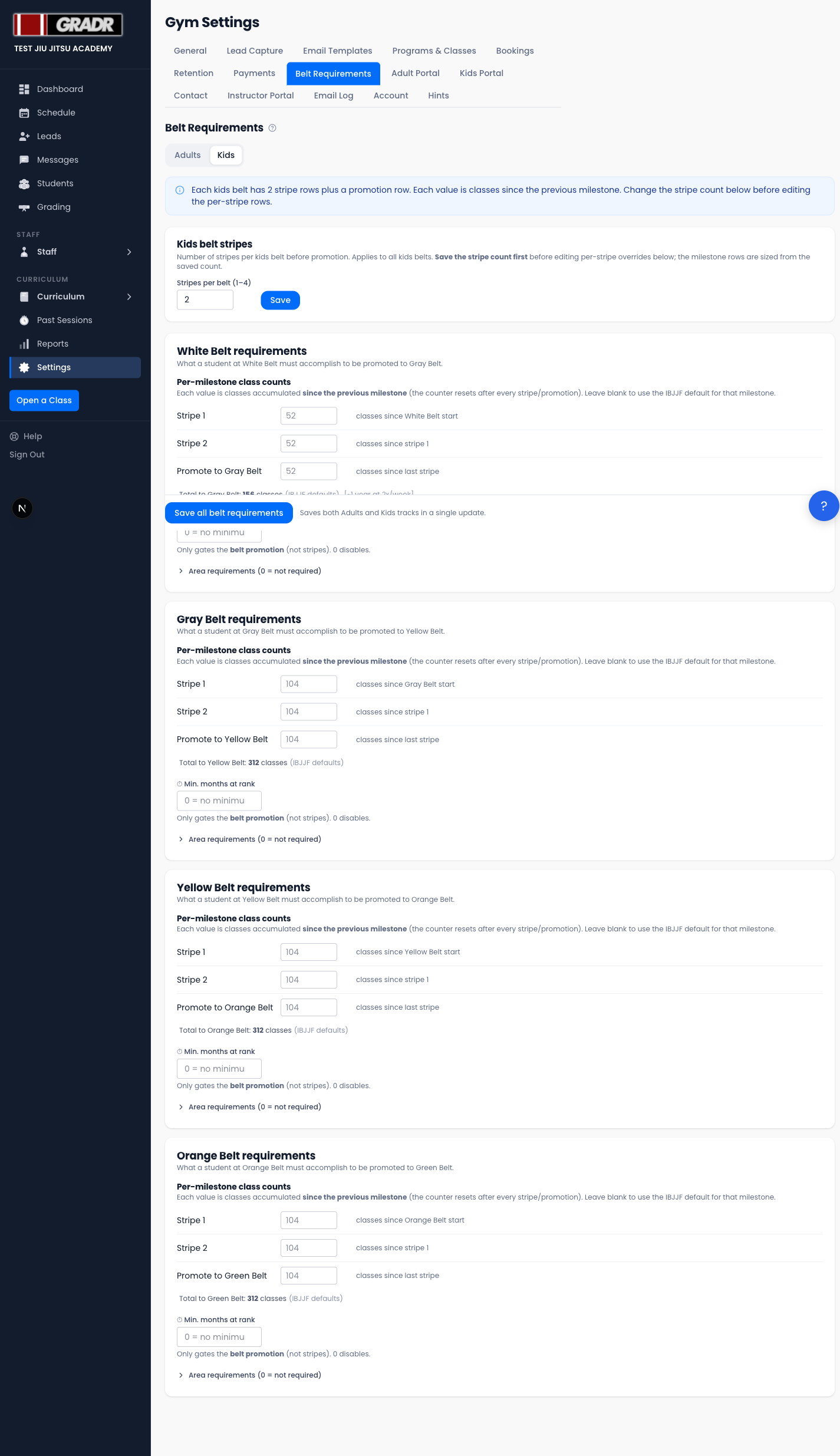
The Kids tab includes one extra control at the top: Kids belt stripes, which sets how many stripes appear on each kids belt (1–4).

Changing this value reshapes the milestone tables for every kids belt: fewer stripes means fewer rows, more stripes means more rows. Save the stripe count first before editing the per-stripe overrides below. If you reduce the count, any saved overrides for stripe numbers above the new maximum are removed on the next save of the belt requirements.
The rest of the Kids tab works exactly like the Adults tab: per-milestone class counts, an optional time gate, and optional area requirements per belt.
Saving
Click Save all belt requirements at the bottom of the page to save the entire form. This saves both Adults and Kids tracks in a single update.
The Kids stripe count is saved separately via the Save button inside the Kids belt stripes card. Make sure to save it first if you have changed it.
How Requirements Reset Across Belts and Stripes
Every milestone's counter is independent and resets when the milestone is awarded:
- After Stripe 1 is awarded, the class counter resets. Stripe 2 counts only classes attended after Stripe 1.
- After a belt promotion, all milestone counters reset. The student starts fresh on the new belt.
- The time gate also resets on every belt promotion, using the promotion date as the start of the new window.
- Area requirements (if configured) count attendance since the most recent belt promotion.
The class they were graded at counts toward their old rank
Stripes are handed out at the end of the class, so that class belongs to the rank the student held while training it. The new count therefore starts from the next day.
This is why a student graded on Tuesday evening shows 0 classes toward their next stripe on Wednesday, not 1. That's correct, and it's the same rule every screen in GRADR follows.
The time gate works slightly differently: it counts from the promotion day itself, not the day after. So a freshly-graded student's "time at this belt" starts ticking immediately, while their class count starts at zero the following day.
One exception: for a transfer student whose promotion date is the same as the day they joined your gym, GRADR treats that date as a start date rather than a grading. A class they train on their first evening still counts.
If you record a promotion with a backdated date, GRADR uses that date as the start of the new window, so historical promotions entered accurately will calculate correctly.
Related
- Running a Grading Session — step-by-step tutorial for running a promotion session
- Grading — overview of the Grading section
- Curriculum Blocks — setting up the curriculum areas used in area requirements